

Basics
Contains all Basic methods.
The Text field is a basic text input field in MoonShine. This field is equivalent to <input type="text">.
use MoonShine\UI\Fields\Text;Text::make('Title')
use MoonShine\UI\Fields\Text;Text::make('Title')
Basic methods
Placeholder
The placeholder() method allows you to set placeholder text for the field.
Mask
The mask() method allows you to apply a mask to the entered text.
Example usage:


Tags
The tags() method transforms the text field into a tag input field.
Disable escaping
The unescape() method disables HTML tag escaping in the field value. It does not affect labels, hints, prefixes, or suffixes; use their separate methods.
This method controls preview escaping only; it does not disable escaping when applying submitted values. By default, previews follow the global escapes.value setting.
Use escape() to explicitly enable preview escaping for a field, even when the global setting is disabled:
use MoonShine\UI\Fields\Text;Text::make('Title')->escape()
use MoonShine\UI\Fields\Text;Text::make('Title')->escape()
Escaping on Apply
Submitted strings are escaped before being applied to data by default. To store the original string, disable this behavior for the field with a closure:
use MoonShine\UI\Fields\Text;Text::make('HTML Content', 'content')->escapeOnApply(fn (Text $field): bool => false)
use MoonShine\UI\Fields\Text;Text::make('HTML Content', 'content')->escapeOnApply(fn (Text $field): bool => false)
The closure receives the current field and returns whether to escape its submitted value. This setting is independent of preview escaping: the example above stores the original string and keeps the preview escaped unless configured otherwise.
Without a local override, the field follows the global escapes.value_on_apply setting. To enable escaping for one field even when it is disabled globally, call the method without an argument:
use MoonShine\UI\Fields\Text;Text::make('Title')->escapeOnApply()
use MoonShine\UI\Fields\Text;Text::make('Title')->escapeOnApply()
Unlike the configurator method, the field method accepts ?Closure $condition = null, not a boolean.
Extensions
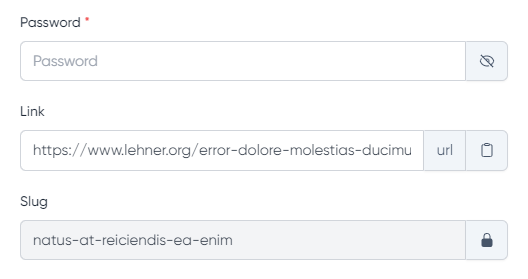
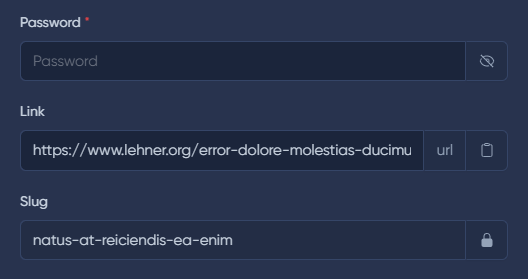
Fields support various extensions to assist with input control.
Copy
The copy() method adds a button to copy the field value.
Hide value
The eye() method adds a button to show/hide the field value (e.g., for passwords).
Lock
The locked() method adds a lock icon to the field.
Prefix
The prefix() method adds a prefix to the input field.
Prefix strings are escaped by default. Use unescapePrefix() for trusted HTML or escapePrefix() to explicitly enable escaping. See Display Escaping.
Suffix
The suffix() method adds a suffix to the input field.
Suffix strings are escaped by default. Use unescapeSuffix() for trusted HTML or escapeSuffix() to explicitly enable escaping. See Display Escaping.
PrettyLimit
The prettyLimit() method allows displaying field value in preview mode with limited width. The full text is shown on hover.
use MoonShine\Support\Enums\Color;use MoonShine\UI\Fields\Text;Text::make('Title', 'title')->prettyLimit(Color::PRIMARY);// with dynamic valuesText::make('Status', 'status')->prettyLimit(color: fn($value, $field) => $value === 'active' ? Color::SUCCESS : Color::ERROR,label: fn($value, $field) => $value === 'active' ? 'Active' : 'Inactive',limit: 200);
use MoonShine\Support\Enums\Color;use MoonShine\UI\Fields\Text;Text::make('Title', 'title')->prettyLimit(Color::PRIMARY);// with dynamic valuesText::make('Status', 'status')->prettyLimit(color: fn($value, $field) => $value === 'active' ? Color::SUCCESS : Color::ERROR,label: fn($value, $field) => $value === 'active' ? 'Active' : 'Inactive',limit: 200);
Learn more about the component in the PrettyLimit section.
Editing in preview mode
This field supports editing in preview mode.
If you want to avoid input errors, you can use the Lock extension.