namespace App\MoonShine\Resources;
use App\Models\Post;
use MoonShine\Resources\ModelResource;
class PostResource extends ModelResource
{
protected string $sortColumn = '';
protected string $sortDirection = 'DESC';
protected int $itemsPerPage = 25;
}
namespace App\MoonShine\Resources;
use App\Models\Post;
use MoonShine\Resources\ModelResource;
class PostResource extends ModelResource
{
protected string $sortColumn = ''; // Поле сортировки по умолчанию
protected string $sortDirection = 'DESC'; // Тип сортировки по умолчанию
protected int $itemsPerPage = 25; // Количество элементов на странице
//...
}
namespace App\MoonShine\Resources;
use App\Models\Post;
use MoonShine\Resources\ModelResource;
class PostResource extends ModelResource
{
protected string $sortColumn = ''; // Поле сортировки по умолчанию
protected string $sortDirection = 'DESC'; // Тип сортировки по умолчанию
protected int $itemsPerPage = 25; // Количество элементов на странице
//...
}
namespace App\MoonShine\Resources;
use App\Models\Post;
use MoonShine\Resources\ModelResource;
class PostResource extends ModelResource
{
protected string $sortColumn = ''; // Поле сортировки по умолчанию
protected string $sortDirection = 'DESC'; // Тип сортировки по умолчанию
protected int $itemsPerPage = 25; // Количество элементов на странице
//...
}
namespace App\MoonShine\Resources;
use App\Models\Post;
use MoonShine\Resources\ModelResource;
class PostResource extends ModelResource
{
protected string $sortColumn = ''; // Поле сортировки по умолчанию
protected string $sortDirection = 'DESC'; // Тип сортировки по умолчанию
protected int $itemsPerPage = 25; // Количество элементов на странице
//...
}
Для добавления кнопок в таблицу используйте ActionButton и методы indexButtons или buttons в ресурсе
public function indexButtons(): array
{
return [
ActionButton::make('Link', '/endpoint'),
];
}
public function indexButtons(): array
{
return [
ActionButton::make('Link', '/endpoint'),
];
}
public function indexButtons(): array
{
return [
ActionButton::make('Link', '/endpoint'),
];
}
public function indexButtons(): array
{
return [
ActionButton::make('Link', '/endpoint'),
];
}
public function indexButtons(): array
{
return [
ActionButton::make('Link', '/endpoint'),
];
}
Пример создания пользовательских кнопок для индексной таблицы в разделе Рецепты
Для массовых действий нужно добавить метод bulk
public function indexButtons(): array
{
return [
ActionButton::make('Link', '/endpoint')->bulk(),
];
}
public function indexButtons(): array
{
return [
ActionButton::make('Link', '/endpoint')->bulk(),
];
}
public function indexButtons(): array
{
return [
ActionButton::make('Link', '/endpoint')->bulk(),
];
}
public function indexButtons(): array
{
return [
ActionButton::make('Link', '/endpoint')->bulk(),
];
}
public function indexButtons(): array
{
return [
ActionButton::make('Link', '/endpoint')->bulk(),
];
}
Вы также можете использовать метод buttons, но в этом случае кнопки будут на всех остальных страницах ресурса
public function buttons(): array
{
return [
ActionButton::make('Link', '/endpoint'),
];
}
public function buttons(): array
{
return [
ActionButton::make('Link', '/endpoint'),
];
}
public function buttons(): array
{
return [
ActionButton::make('Link', '/endpoint'),
];
}
public function buttons(): array
{
return [
ActionButton::make('Link', '/endpoint'),
];
}
public function buttons(): array
{
return [
ActionButton::make('Link', '/endpoint'),
];
}
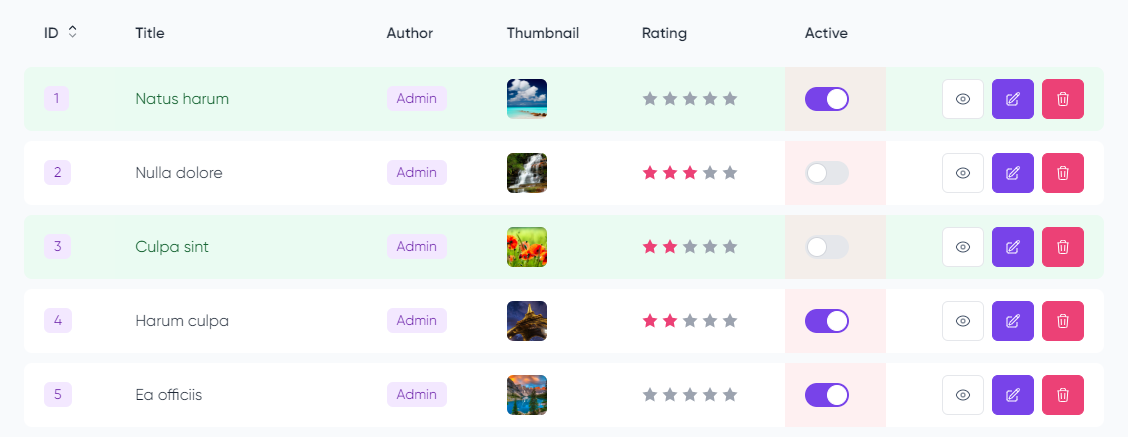
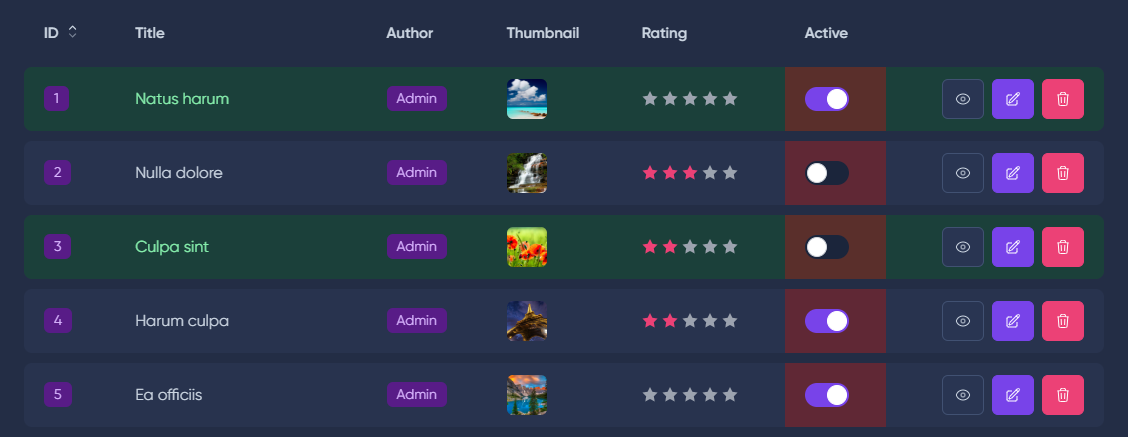
Через ресурсы моделей есть возможность настроить tr и td таблицы данных.
Для этого необходимо использовать соответствующие методы trAttributes() и tdAttributes(), которым нужно передать замыкание, возвращающее атрибуты для компонента таблицы.
namespace App\MoonShine\Resources;
use App\Models\Post;
use Closure;
use Illuminate\View\ComponentAttributeBag;
use MoonShine\Fields\Text;
use MoonShine\Resources\ModelResource;
class PostResource extends ModelResource
{
protected string $model = Post::class;
protected string $title = 'Posts';
public function trAttributes(): Closure
{
return function (
Model $item,
int $row,
ComponentAttributeBag $attr
): ComponentAttributeBag {
if ($item->id === 1 | $row === 2) {
$attr->setAttributes([
'class' => 'bgc-green'
]);
}
return $attr;
};
}
public function tdAttributes(): Closure
{
return function (
Model $item,
int $row,
int $cell,
ComponentAttributeBag $attr = null
): ComponentAttributeBag {
if ($cell === 6) {
$attr->setAttributes([
'class' => 'bgc-red'
]);
}
return $attr;
};
}
}
namespace App\MoonShine\Resources;
use App\Models\Post;
use Closure;
use Illuminate\View\ComponentAttributeBag;
use MoonShine\Fields\Text;
use MoonShine\Resources\ModelResource;
class PostResource extends ModelResource
{
protected string $model = Post::class;
protected string $title = 'Posts';
//...
public function trAttributes(): Closure
{
return function (
Model $item,
int $row,
ComponentAttributeBag $attr
): ComponentAttributeBag {
if ($item->id === 1 | $row === 2) {
$attr->setAttributes([
'class' => 'bgc-green'
]);
}
return $attr;
};
}
public function tdAttributes(): Closure
{
return function (
Model $item,
int $row,
int $cell,
ComponentAttributeBag $attr = null
): ComponentAttributeBag {
if ($cell === 6) {
$attr->setAttributes([
'class' => 'bgc-red'
]);
}
return $attr;
};
}
//...
}
namespace App\MoonShine\Resources;
use App\Models\Post;
use Closure;
use Illuminate\View\ComponentAttributeBag;
use MoonShine\Fields\Text;
use MoonShine\Resources\ModelResource;
class PostResource extends ModelResource
{
protected string $model = Post::class;
protected string $title = 'Posts';
//...
public function trAttributes(): Closure
{
return function (
Model $item,
int $row,
ComponentAttributeBag $attr
): ComponentAttributeBag {
if ($item->id === 1 | $row === 2) {
$attr->setAttributes([
'class' => 'bgc-green'
]);
}
return $attr;
};
}
public function tdAttributes(): Closure
{
return function (
Model $item,
int $row,
int $cell,
ComponentAttributeBag $attr = null
): ComponentAttributeBag {
if ($cell === 6) {
$attr->setAttributes([
'class' => 'bgc-red'
]);
}
return $attr;
};
}
//...
}
namespace App\MoonShine\Resources;
use App\Models\Post;
use Closure;
use Illuminate\View\ComponentAttributeBag;
use MoonShine\Fields\Text;
use MoonShine\Resources\ModelResource;
class PostResource extends ModelResource
{
protected string $model = Post::class;
protected string $title = 'Posts';
//...
public function trAttributes(): Closure
{
return function (
Model $item,
int $row,
ComponentAttributeBag $attr
): ComponentAttributeBag {
if ($item->id === 1 | $row === 2) {
$attr->setAttributes([
'class' => 'bgc-green'
]);
}
return $attr;
};
}
public function tdAttributes(): Closure
{
return function (
Model $item,
int $row,
int $cell,
ComponentAttributeBag $attr = null
): ComponentAttributeBag {
if ($cell === 6) {
$attr->setAttributes([
'class' => 'bgc-red'
]);
}
return $attr;
};
}
//...
}
namespace App\MoonShine\Resources;
use App\Models\Post;
use Closure;
use Illuminate\View\ComponentAttributeBag;
use MoonShine\Fields\Text;
use MoonShine\Resources\ModelResource;
class PostResource extends ModelResource
{
protected string $model = Post::class;
protected string $title = 'Posts';
//...
public function trAttributes(): Closure
{
return function (
Model $item,
int $row,
ComponentAttributeBag $attr
): ComponentAttributeBag {
if ($item->id === 1 | $row === 2) {
$attr->setAttributes([
'class' => 'bgc-green'
]);
}
return $attr;
};
}
public function tdAttributes(): Closure
{
return function (
Model $item,
int $row,
int $cell,
ComponentAttributeBag $attr = null
): ComponentAttributeBag {
if ($cell === 6) {
$attr->setAttributes([
'class' => 'bgc-red'
]);
}
return $attr;
};
}
//...
}
По умолчанию при клике на tr ничего не произойдет, но вы можете изменить поведение на переход к редактированию, выбор или переход к детальному просмотру
protected ?ClickAction $clickAction = ClickAction::SELECT;
// Свойство ресурса
// ClickAction::SELECT, ClickAction::DETAIL, ClickAction::EDIT
protected ?ClickAction $clickAction = ClickAction::SELECT;
// Свойство ресурса
// ClickAction::SELECT, ClickAction::DETAIL, ClickAction::EDIT
protected ?ClickAction $clickAction = ClickAction::SELECT;
// Свойство ресурса
// ClickAction::SELECT, ClickAction::DETAIL, ClickAction::EDIT
protected ?ClickAction $clickAction = ClickAction::SELECT;
// Свойство ресурса
// ClickAction::SELECT, ClickAction::DETAIL, ClickAction::EDIT
protected ?ClickAction $clickAction = ClickAction::SELECT;
Свойство stickyTable ресурса модели позволяет зафиксировать заголовок при прокрутке таблицы с большим количеством элементов.
namespace App\MoonShine\Resources;
use MoonShine\Resources\ModelResource;
class PostResource extends ModelResource
{
protected string $model = Post::class;
protected string $title = 'Posts';
protected bool $stickyTable = true;
}
namespace App\MoonShine\Resources;
use MoonShine\Resources\ModelResource;
class PostResource extends ModelResource
{
protected string $model = Post::class;
protected string $title = 'Posts';
protected bool $stickyTable = true;
// ...
}
namespace App\MoonShine\Resources;
use MoonShine\Resources\ModelResource;
class PostResource extends ModelResource
{
protected string $model = Post::class;
protected string $title = 'Posts';
protected bool $stickyTable = true;
// ...
}
namespace App\MoonShine\Resources;
use MoonShine\Resources\ModelResource;
class PostResource extends ModelResource
{
protected string $model = Post::class;
protected string $title = 'Posts';
protected bool $stickyTable = true;
// ...
}
namespace App\MoonShine\Resources;
use MoonShine\Resources\ModelResource;
class PostResource extends ModelResource
{
protected string $model = Post::class;
protected string $title = 'Posts';
protected bool $stickyTable = true;
// ...
}
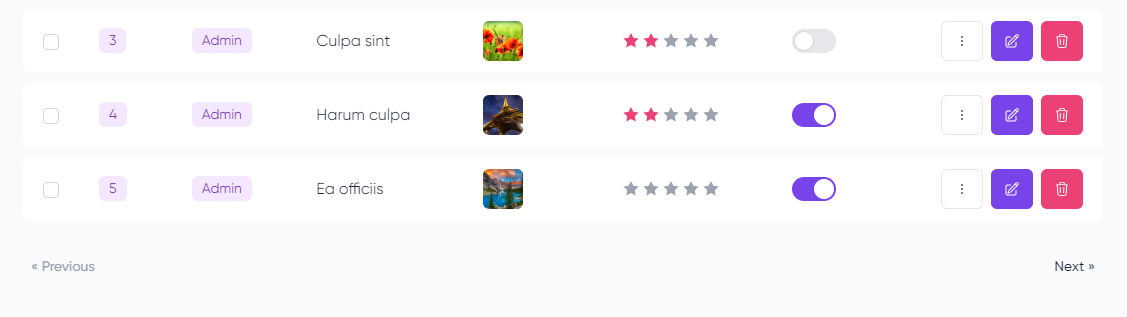
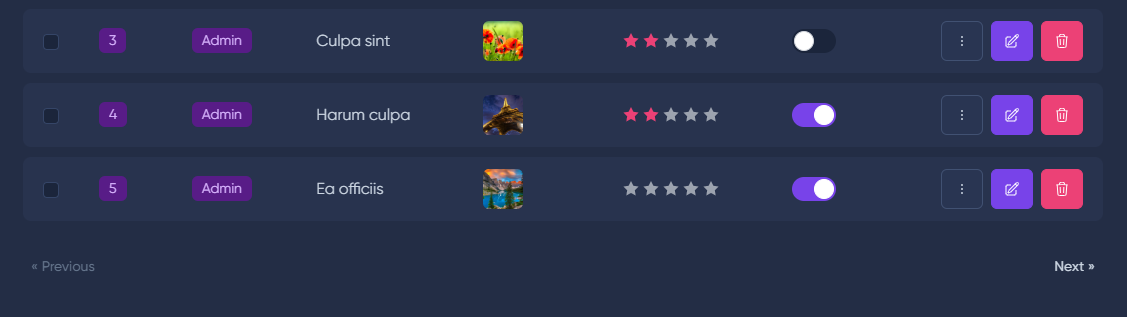
Если вы не планируете отображать общее количество страниц, используйте Simple Pagination. Это позволит избежать дополнительных запросов для подсчета общего количества записей в базе данных.
namespace App\MoonShine\Resources;
use App\Models\Post;
use MoonShine\Resources\ModelResource;
class PostResource extends ModelResource
{
protected string $model = Post::class;
protected string $title = 'Posts';
protected bool $simplePaginate = true;
}
namespace App\MoonShine\Resources;
use App\Models\Post;
use MoonShine\Resources\ModelResource;
class PostResource extends ModelResource
{
protected string $model = Post::class;
protected string $title = 'Posts';
protected bool $simplePaginate = true;
// ...
}
namespace App\MoonShine\Resources;
use App\Models\Post;
use MoonShine\Resources\ModelResource;
class PostResource extends ModelResource
{
protected string $model = Post::class;
protected string $title = 'Posts';
protected bool $simplePaginate = true;
// ...
}
namespace App\MoonShine\Resources;
use App\Models\Post;
use MoonShine\Resources\ModelResource;
class PostResource extends ModelResource
{
protected string $model = Post::class;
protected string $title = 'Posts';
protected bool $simplePaginate = true;
// ...
}
namespace App\MoonShine\Resources;
use App\Models\Post;
use MoonShine\Resources\ModelResource;
class PostResource extends ModelResource
{
protected string $model = Post::class;
protected string $title = 'Posts';
protected bool $simplePaginate = true;
// ...
}
Если вы не планируете использовать пагинацию, вы можете ее отключить.
namespace App\MoonShine\Resources;
use App\Models\Post;
use MoonShine\Resources\ModelResource;
class PostResource extends ModelResource
{
protected string $model = Post::class;
protected string $title = 'Posts';
protected bool $usePagination = false;
}
namespace App\MoonShine\Resources;
use App\Models\Post;
use MoonShine\Resources\ModelResource;
class PostResource extends ModelResource
{
protected string $model = Post::class;
protected string $title = 'Posts';
protected bool $usePagination = false;
// ...
}
namespace App\MoonShine\Resources;
use App\Models\Post;
use MoonShine\Resources\ModelResource;
class PostResource extends ModelResource
{
protected string $model = Post::class;
protected string $title = 'Posts';
protected bool $usePagination = false;
// ...
}
namespace App\MoonShine\Resources;
use App\Models\Post;
use MoonShine\Resources\ModelResource;
class PostResource extends ModelResource
{
protected string $model = Post::class;
protected string $title = 'Posts';
protected bool $usePagination = false;
// ...
}
namespace App\MoonShine\Resources;
use App\Models\Post;
use MoonShine\Resources\ModelResource;
class PostResource extends ModelResource
{
protected string $model = Post::class;
protected string $title = 'Posts';
protected bool $usePagination = false;
// ...
}
Переключение режима без перезагрузки для фильтрации, сортировки и пагинации.
namespace App\MoonShine\Resources;
use App\Models\Post;
use MoonShine\Resources\ModelResource;
class PostResource extends ModelResource
{
protected string $model = Post::class;
protected string $title = 'Posts';
protected bool $isAsync = true;
}
namespace App\MoonShine\Resources;
use App\Models\Post;
use MoonShine\Resources\ModelResource;
class PostResource extends ModelResource
{
protected string $model = Post::class;
protected string $title = 'Posts';
protected bool $isAsync = true;
// ...
}
namespace App\MoonShine\Resources;
use App\Models\Post;
use MoonShine\Resources\ModelResource;
class PostResource extends ModelResource
{
protected string $model = Post::class;
protected string $title = 'Posts';
protected bool $isAsync = true;
// ...
}
namespace App\MoonShine\Resources;
use App\Models\Post;
use MoonShine\Resources\ModelResource;
class PostResource extends ModelResource
{
protected string $model = Post::class;
protected string $title = 'Posts';
protected bool $isAsync = true;
// ...
}
namespace App\MoonShine\Resources;
use App\Models\Post;
use MoonShine\Resources\ModelResource;
class PostResource extends ModelResource
{
protected string $model = Post::class;
protected string $title = 'Posts';
protected bool $isAsync = true;
// ...
}
Вы можете обновить строку таблицы асинхронно; для этого необходимо вызвать событие:
table-row-updated-{{componentName}}-{{row-key}}
table-row-updated-{{componentName}}-{{row-key}}
table-row-updated-{{componentName}}-{{row-key}}
table-row-updated-{{componentName}}-{{row-key}}
table-row-updated-{{componentName}}-{{row-key}}
-{{componentName}} - имя компонента;
-{{row-key}} - ключ строки.
Для добавления события можно использовать вспомогательный класс:
AlpineJs::event(JsEvent::TABLE_ROW_UPDATED, 'main-table-{row-id}')
AlpineJs::event(JsEvent::TABLE_ROW_UPDATED, 'main-table-{row-id}')
AlpineJs::event(JsEvent::TABLE_ROW_UPDATED, 'main-table-{row-id}')
AlpineJs::event(JsEvent::TABLE_ROW_UPDATED, 'main-table-{row-id}')
AlpineJs::event(JsEvent::TABLE_ROW_UPDATED, 'main-table-{row-id}')
-{row-id} - шорткод для id текущей записи модели.
Наличие поля ID и асинхронного режима обязательно.
namespace App\MoonShine\Resources;
use App\Models\Post;
use MoonShine\Enums\JsEvent;
use MoonShine\Fields\ID;
use MoonShine\Fields\Switcher;
use MoonShine\Fields\Text;
use MoonShine\Fields\Textarea;
use MoonShine\Resources\ModelResource;
use MoonShine\Support\AlpineJs;
class PostResource extends ModelResource
{
protected string $model = Post::class;
protected string $title = 'Posts';
protected bool $isAsync = true;
public function fields(): array
{
return [
ID::make(),
Text::make('Title'),
Textarea::make('Body'),
Switcher::make('Active')
->updateOnPreview(
events: [AlpineJs::event(JsEvent::TABLE_ROW_UPDATED, 'index-table-{row-id}')]
)
];
}
}
namespace App\MoonShine\Resources;
use App\Models\Post;
use MoonShine\Enums\JsEvent;
use MoonShine\Fields\ID;
use MoonShine\Fields\Switcher;
use MoonShine\Fields\Text;
use MoonShine\Fields\Textarea;
use MoonShine\Resources\ModelResource;
use MoonShine\Support\AlpineJs;
class PostResource extends ModelResource
{
protected string $model = Post::class;
protected string $title = 'Posts';
protected bool $isAsync = true;
//...
public function fields(): array
{
return [
ID::make(),
Text::make('Title'),
Textarea::make('Body'),
Switcher::make('Active')
->updateOnPreview(
events: [AlpineJs::event(JsEvent::TABLE_ROW_UPDATED, 'index-table-{row-id}')]
)
];
}
//...
}
namespace App\MoonShine\Resources;
use App\Models\Post;
use MoonShine\Enums\JsEvent;
use MoonShine\Fields\ID;
use MoonShine\Fields\Switcher;
use MoonShine\Fields\Text;
use MoonShine\Fields\Textarea;
use MoonShine\Resources\ModelResource;
use MoonShine\Support\AlpineJs;
class PostResource extends ModelResource
{
protected string $model = Post::class;
protected string $title = 'Posts';
protected bool $isAsync = true;
//...
public function fields(): array
{
return [
ID::make(),
Text::make('Title'),
Textarea::make('Body'),
Switcher::make('Active')
->updateOnPreview(
events: [AlpineJs::event(JsEvent::TABLE_ROW_UPDATED, 'index-table-{row-id}')]
)
];
}
//...
}
namespace App\MoonShine\Resources;
use App\Models\Post;
use MoonShine\Enums\JsEvent;
use MoonShine\Fields\ID;
use MoonShine\Fields\Switcher;
use MoonShine\Fields\Text;
use MoonShine\Fields\Textarea;
use MoonShine\Resources\ModelResource;
use MoonShine\Support\AlpineJs;
class PostResource extends ModelResource
{
protected string $model = Post::class;
protected string $title = 'Posts';
protected bool $isAsync = true;
//...
public function fields(): array
{
return [
ID::make(),
Text::make('Title'),
Textarea::make('Body'),
Switcher::make('Active')
->updateOnPreview(
events: [AlpineJs::event(JsEvent::TABLE_ROW_UPDATED, 'index-table-{row-id}')]
)
];
}
//...
}
namespace App\MoonShine\Resources;
use App\Models\Post;
use MoonShine\Enums\JsEvent;
use MoonShine\Fields\ID;
use MoonShine\Fields\Switcher;
use MoonShine\Fields\Text;
use MoonShine\Fields\Textarea;
use MoonShine\Resources\ModelResource;
use MoonShine\Support\AlpineJs;
class PostResource extends ModelResource
{
protected string $model = Post::class;
protected string $title = 'Posts';
protected bool $isAsync = true;
//...
public function fields(): array
{
return [
ID::make(),
Text::make('Title'),
Textarea::make('Body'),
Switcher::make('Active')
->updateOnPreview(
events: [AlpineJs::event(JsEvent::TABLE_ROW_UPDATED, 'index-table-{row-id}')]
)
];
}
//...
}
Также доступен метод withUpdateRow(), который помогает упростить назначение события:
TableBuilder::make()
->fields([
ID::make()->sortable(),
Text::make('Title'),
Textarea::make('Body'),
Switcher::make('Active')
->withUpdateRow('main-table')
])
->items($this->fetch())
->name('main-table')
->async(),
TableBuilder::make()
->fields([
ID::make()->sortable(),
Text::make('Title'),
Textarea::make('Body'),
Switcher::make('Active')
->withUpdateRow('main-table')
])
->items($this->fetch())
->name('main-table')
->async(),
TableBuilder::make()
->fields([
ID::make()->sortable(),
Text::make('Title'),
Textarea::make('Body'),
Switcher::make('Active')
->withUpdateRow('main-table')
])
->items($this->fetch())
->name('main-table')
->async(),
TableBuilder::make()
->fields([
ID::make()->sortable(),
Text::make('Title'),
Textarea::make('Body'),
Switcher::make('Active')
->withUpdateRow('main-table')
])
->items($this->fetch())
->name('main-table')
->async(),
TableBuilder::make()
->fields([
ID::make()->sortable(),
Text::make('Title'),
Textarea::make('Body'),
Switcher::make('Active')
->withUpdateRow('main-table')
])
->items($this->fetch())
->name('main-table')
->async(),
Вы можете позволить пользователям решать, какие столбцы отображать в таблице, сохраняя выбор. Для этого необходимо установить параметр ресурса $columnSelection.
namespace App\MoonShine\Resources;
use App\Models\Post;
use MoonShine\Resources\ModelResource;
class PostResource extends ModelResource
{
protected string $model = Post::class;
protected string $title = 'Posts';
protected bool $columnSelection = true;
}
namespace App\MoonShine\Resources;
use App\Models\Post;
use MoonShine\Resources\ModelResource;
class PostResource extends ModelResource
{
protected string $model = Post::class;
protected string $title = 'Posts';
protected bool $columnSelection = true;
//...
}
namespace App\MoonShine\Resources;
use App\Models\Post;
use MoonShine\Resources\ModelResource;
class PostResource extends ModelResource
{
protected string $model = Post::class;
protected string $title = 'Posts';
protected bool $columnSelection = true;
//...
}
namespace App\MoonShine\Resources;
use App\Models\Post;
use MoonShine\Resources\ModelResource;
class PostResource extends ModelResource
{
protected string $model = Post::class;
protected string $title = 'Posts';
protected bool $columnSelection = true;
//...
}
namespace App\MoonShine\Resources;
use App\Models\Post;
use MoonShine\Resources\ModelResource;
class PostResource extends ModelResource
{
protected string $model = Post::class;
protected string $title = 'Posts';
protected bool $columnSelection = true;
//...
}
Если нужно исключить поля из выбора, используйте метод columnSelection().
public function columnSelection(bool $active = true)
public function columnSelection(bool $active = true)
public function columnSelection(bool $active = true)
public function columnSelection(bool $active = true)
public function columnSelection(bool $active = true)
namespace App\MoonShine\Resources;
use App\Models\Post;
use MoonShine\Fields\ID;
use MoonShine\Fields\Text;
use MoonShine\Fields\Textarea;
use MoonShine\Resources\ModelResource;
class PostResource extends ModelResource
{
protected string $model = Post::class;
protected string $title = 'Posts';
protected bool $columnSelection = true;
public function fields(): array
{
return [
ID::make()
->columnSelection(false),
Text::make('Title'),
Textarea::make('Body'),
];
}
}
namespace App\MoonShine\Resources;
use App\Models\Post;
use MoonShine\Fields\ID;
use MoonShine\Fields\Text;
use MoonShine\Fields\Textarea;
use MoonShine\Resources\ModelResource;
class PostResource extends ModelResource
{
protected string $model = Post::class;
protected string $title = 'Posts';
protected bool $columnSelection = true;
//...
public function fields(): array
{
return [
ID::make()
->columnSelection(false),
Text::make('Title'),
Textarea::make('Body'),
];
}
//...
}
namespace App\MoonShine\Resources;
use App\Models\Post;
use MoonShine\Fields\ID;
use MoonShine\Fields\Text;
use MoonShine\Fields\Textarea;
use MoonShine\Resources\ModelResource;
class PostResource extends ModelResource
{
protected string $model = Post::class;
protected string $title = 'Posts';
protected bool $columnSelection = true;
//...
public function fields(): array
{
return [
ID::make()
->columnSelection(false),
Text::make('Title'),
Textarea::make('Body'),
];
}
//...
}
namespace App\MoonShine\Resources;
use App\Models\Post;
use MoonShine\Fields\ID;
use MoonShine\Fields\Text;
use MoonShine\Fields\Textarea;
use MoonShine\Resources\ModelResource;
class PostResource extends ModelResource
{
protected string $model = Post::class;
protected string $title = 'Posts';
protected bool $columnSelection = true;
//...
public function fields(): array
{
return [
ID::make()
->columnSelection(false),
Text::make('Title'),
Textarea::make('Body'),
];
}
//...
}
namespace App\MoonShine\Resources;
use App\Models\Post;
use MoonShine\Fields\ID;
use MoonShine\Fields\Text;
use MoonShine\Fields\Textarea;
use MoonShine\Resources\ModelResource;
class PostResource extends ModelResource
{
protected string $model = Post::class;
protected string $title = 'Posts';
protected bool $columnSelection = true;
//...
public function fields(): array
{
return [
ID::make()
->columnSelection(false),
Text::make('Title'),
Textarea::make('Body'),
];
}
//...
}
Вы можете заменить thead или tbody или tfoot, а также добавить элементы в таблицу в tbody до и после первой строки.
thead()
namespace App\MoonShine\Resources;
use MoonShine\Fields\Fields;
use MoonShine\Resources\ModelResource;
class PostResource extends ModelResource
{
public function thead(): ?Closure
{
return static fn(Fields $headFields): string => '<tr><th>Title</th></tr>';
}
}
namespace App\MoonShine\Resources;
use MoonShine\Fields\Fields;
use MoonShine\Resources\ModelResource;
class PostResource extends ModelResource
{
// ...
public function thead(): ?Closure
{
return static fn(Fields $headFields): string => '<tr><th>Title</th></tr>';
}
}
namespace App\MoonShine\Resources;
use MoonShine\Fields\Fields;
use MoonShine\Resources\ModelResource;
class PostResource extends ModelResource
{
// ...
public function thead(): ?Closure
{
return static fn(Fields $headFields): string => '<tr><th>Title</th></tr>';
}
}
namespace App\MoonShine\Resources;
use MoonShine\Fields\Fields;
use MoonShine\Resources\ModelResource;
class PostResource extends ModelResource
{
// ...
public function thead(): ?Closure
{
return static fn(Fields $headFields): string => '<tr><th>Title</th></tr>';
}
}
namespace App\MoonShine\Resources;
use MoonShine\Fields\Fields;
use MoonShine\Resources\ModelResource;
class PostResource extends ModelResource
{
// ...
public function thead(): ?Closure
{
return static fn(Fields $headFields): string => '<tr><th>Title</th></tr>';
}
}
tbody()
namespace App\MoonShine\Resources;
use Illuminate\Support\Collection;
use MoonShine\Resources\ModelResource;
class PostResource extends ModelResource
{
public function tbody(): ?Closure
{
return static fn(Collection $rows): string => '<tr><td>Content</td></tr>';
}
}
namespace App\MoonShine\Resources;
use Illuminate\Support\Collection;
use MoonShine\Resources\ModelResource;
class PostResource extends ModelResource
{
// ...
public function tbody(): ?Closure
{
return static fn(Collection $rows): string => '<tr><td>Content</td></tr>';
}
}
namespace App\MoonShine\Resources;
use Illuminate\Support\Collection;
use MoonShine\Resources\ModelResource;
class PostResource extends ModelResource
{
// ...
public function tbody(): ?Closure
{
return static fn(Collection $rows): string => '<tr><td>Content</td></tr>';
}
}
namespace App\MoonShine\Resources;
use Illuminate\Support\Collection;
use MoonShine\Resources\ModelResource;
class PostResource extends ModelResource
{
// ...
public function tbody(): ?Closure
{
return static fn(Collection $rows): string => '<tr><td>Content</td></tr>';
}
}
namespace App\MoonShine\Resources;
use Illuminate\Support\Collection;
use MoonShine\Resources\ModelResource;
class PostResource extends ModelResource
{
// ...
public function tbody(): ?Closure
{
return static fn(Collection $rows): string => '<tr><td>Content</td></tr>';
}
}
tfoot()
namespace App\MoonShine\Resources;
use MoonShine\ActionButtons\ActionButtons;
use MoonShine\Resources\ModelResource;
class PostResource extends ModelResource
{
public function tfoot(): ?Closure
{
return static fn(ActionButtons $bulkButtons): string => '<tr><td>Footer</td></tr>';
}
}
namespace App\MoonShine\Resources;
use MoonShine\ActionButtons\ActionButtons;
use MoonShine\Resources\ModelResource;
class PostResource extends ModelResource
{
// ...
public function tfoot(): ?Closure
{
return static fn(ActionButtons $bulkButtons): string => '<tr><td>Footer</td></tr>';
}
}
namespace App\MoonShine\Resources;
use MoonShine\ActionButtons\ActionButtons;
use MoonShine\Resources\ModelResource;
class PostResource extends ModelResource
{
// ...
public function tfoot(): ?Closure
{
return static fn(ActionButtons $bulkButtons): string => '<tr><td>Footer</td></tr>';
}
}
namespace App\MoonShine\Resources;
use MoonShine\ActionButtons\ActionButtons;
use MoonShine\Resources\ModelResource;
class PostResource extends ModelResource
{
// ...
public function tfoot(): ?Closure
{
return static fn(ActionButtons $bulkButtons): string => '<tr><td>Footer</td></tr>';
}
}
namespace App\MoonShine\Resources;
use MoonShine\ActionButtons\ActionButtons;
use MoonShine\Resources\ModelResource;
class PostResource extends ModelResource
{
// ...
public function tfoot(): ?Closure
{
return static fn(ActionButtons $bulkButtons): string => '<tr><td>Footer</td></tr>';
}
}
tbodyBefore()
namespace App\MoonShine\Resources;
use Illuminate\Support\Collection;
use MoonShine\Resources\ModelResource;
class PostResource extends ModelResource
{
public function tbodyBefore(): ?Closure
{
return static fn(Collection $rows): string => '<tr><td>Before</td></tr>';
}
}
namespace App\MoonShine\Resources;
use Illuminate\Support\Collection;
use MoonShine\Resources\ModelResource;
class PostResource extends ModelResource
{
// ...
public function tbodyBefore(): ?Closure
{
return static fn(Collection $rows): string => '<tr><td>Before</td></tr>';
}
}
namespace App\MoonShine\Resources;
use Illuminate\Support\Collection;
use MoonShine\Resources\ModelResource;
class PostResource extends ModelResource
{
// ...
public function tbodyBefore(): ?Closure
{
return static fn(Collection $rows): string => '<tr><td>Before</td></tr>';
}
}
namespace App\MoonShine\Resources;
use Illuminate\Support\Collection;
use MoonShine\Resources\ModelResource;
class PostResource extends ModelResource
{
// ...
public function tbodyBefore(): ?Closure
{
return static fn(Collection $rows): string => '<tr><td>Before</td></tr>';
}
}
namespace App\MoonShine\Resources;
use Illuminate\Support\Collection;
use MoonShine\Resources\ModelResource;
class PostResource extends ModelResource
{
// ...
public function tbodyBefore(): ?Closure
{
return static fn(Collection $rows): string => '<tr><td>Before</td></tr>';
}
}
tbodyAfter()
namespace App\MoonShine\Resources;
use Illuminate\Support\Collection;
use MoonShine\Resources\ModelResource;
class PostResource extends ModelResource
{
public function tbodyAfter(): ?Closure
{
return static fn(Collection $rows): string => '<tr><td>After</td></tr>';
}
}
namespace App\MoonShine\Resources;
use Illuminate\Support\Collection;
use MoonShine\Resources\ModelResource;
class PostResource extends ModelResource
{
// ...
public function tbodyAfter(): ?Closure
{
return static fn(Collection $rows): string => '<tr><td>After</td></tr>';
}
}
namespace App\MoonShine\Resources;
use Illuminate\Support\Collection;
use MoonShine\Resources\ModelResource;
class PostResource extends ModelResource
{
// ...
public function tbodyAfter(): ?Closure
{
return static fn(Collection $rows): string => '<tr><td>After</td></tr>';
}
}
namespace App\MoonShine\Resources;
use Illuminate\Support\Collection;
use MoonShine\Resources\ModelResource;
class PostResource extends ModelResource
{
// ...
public function tbodyAfter(): ?Closure
{
return static fn(Collection $rows): string => '<tr><td>After</td></tr>';
}
}
namespace App\MoonShine\Resources;
use Illuminate\Support\Collection;
use MoonShine\Resources\ModelResource;
class PostResource extends ModelResource
{
// ...
public function tbodyAfter(): ?Closure
{
return static fn(Collection $rows): string => '<tr><td>After</td></tr>';
}
}

