Поле HasMany предназначено для работы с одноименной связью в Laravel и включает все Базовые методы.
HasMany::make(
Closure|string $label,
?string $relationName = null,
Closure|string|null $formatted = null,
ModelResource|string|null $resource = null,
)
HasMany::make(
Closure|string $label,
?string $relationName = null,
Closure|string|null $formatted = null,
ModelResource|string|null $resource = null,
)
HasMany::make(
Closure|string $label,
?string $relationName = null,
Closure|string|null $formatted = null,
ModelResource|string|null $resource = null,
)
HasMany::make(
Closure|string $label,
?string $relationName = null,
Closure|string|null $formatted = null,
ModelResource|string|null $resource = null,
)
HasMany::make(
Closure|string $label,
?string $relationName = null,
Closure|string|null $formatted = null,
ModelResource|string|null $resource = null,
)
$label - метка, заголовок поля,$relationName - имя отношения,$resource - ModelResource, на который ссылается отношение.
Параметр $formatted не используется в поле HasMany!
Наличие ModelResource, на который ссылается отношение, обязательно.
Ресурс также необходимо зарегистрировать
в сервис-провайдере MoonShineServiceProvider в методе $core->resources().
В противном случае будет ошибка 500.
use MoonShine\Laravel\Fields\Relationships\HasMany;
HasMany::make(
'Comments',
'comments',
resource: CommentResource::class
)
namespaces
use MoonShine\Laravel\Fields\Relationships\HasMany;
HasMany::make(
'Comments',
'comments',
resource: CommentResource::class
)
use MoonShine\Laravel\Fields\Relationships\HasMany;
HasMany::make(
'Comments',
'comments',
resource: CommentResource::class
)
namespaces
use MoonShine\Laravel\Fields\Relationships\HasMany;
HasMany::make(
'Comments',
'comments',
resource: CommentResource::class
)
use MoonShine\Laravel\Fields\Relationships\HasMany;
HasMany::make(
'Comments',
'comments',
resource: CommentResource::class
)
Поле BelongsTo, указывающее на родительскую запись, является обязательным.
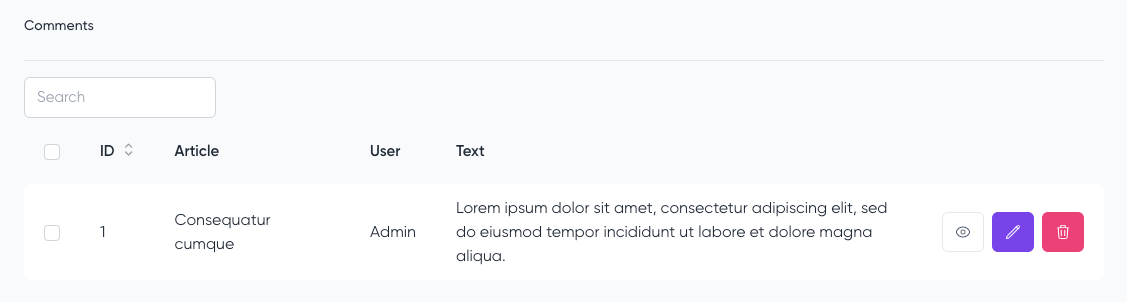
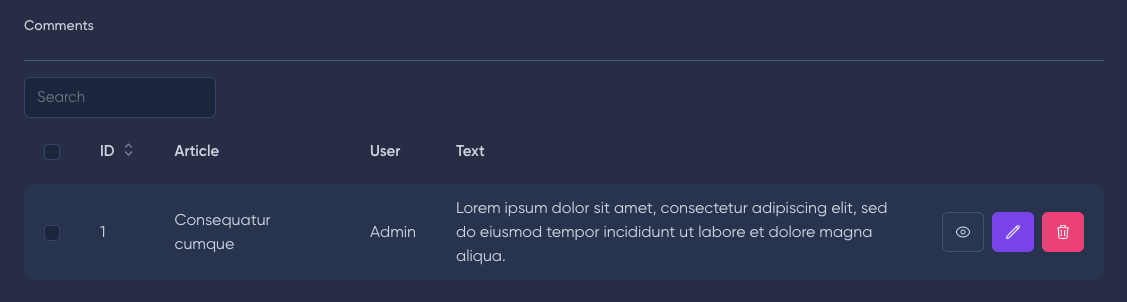
Вы можете опустить $resource, если ModelResource совпадает с названием связи.
use MoonShine\Laravel\Fields\Relationships\HasMany;
HasMany::make('Comments', 'comments')
namespaces
use MoonShine\Laravel\Fields\Relationships\HasMany;
HasMany::make('Comments', 'comments')
use MoonShine\Laravel\Fields\Relationships\HasMany;
HasMany::make('Comments', 'comments')
namespaces
use MoonShine\Laravel\Fields\Relationships\HasMany;
HasMany::make('Comments', 'comments')
use MoonShine\Laravel\Fields\Relationships\HasMany;
HasMany::make('Comments', 'comments')
Если вы не указываете $relationName, тогда имя отношения будет определено автоматически на основе $label (по правилам camelCase).
use MoonShine\Laravel\Fields\Relationships\HasMany;
HasMany::make('Comments')
namespaces
use MoonShine\Laravel\Fields\Relationships\HasMany;
HasMany::make('Comments')
use MoonShine\Laravel\Fields\Relationships\HasMany;
HasMany::make('Comments')
namespaces
use MoonShine\Laravel\Fields\Relationships\HasMany;
HasMany::make('Comments')
use MoonShine\Laravel\Fields\Relationships\HasMany;
HasMany::make('Comments')
По умолчанию поле отображается вне основной формы.
Если вы хотите изменить это поведение и отобразить его внутри основной формы, воспользуйтесь методом disableOutside().
use MoonShine\Laravel\Fields\Relationships\HasMany;
HasMany::make('Comments')->disableOutside()
namespaces
use MoonShine\Laravel\Fields\Relationships\HasMany;
HasMany::make('Comments')->disableOutside()
use MoonShine\Laravel\Fields\Relationships\HasMany;
HasMany::make('Comments')->disableOutside()
namespaces
use MoonShine\Laravel\Fields\Relationships\HasMany;
HasMany::make('Comments')->disableOutside()
use MoonShine\Laravel\Fields\Relationships\HasMany;
HasMany::make('Comments')->disableOutside()
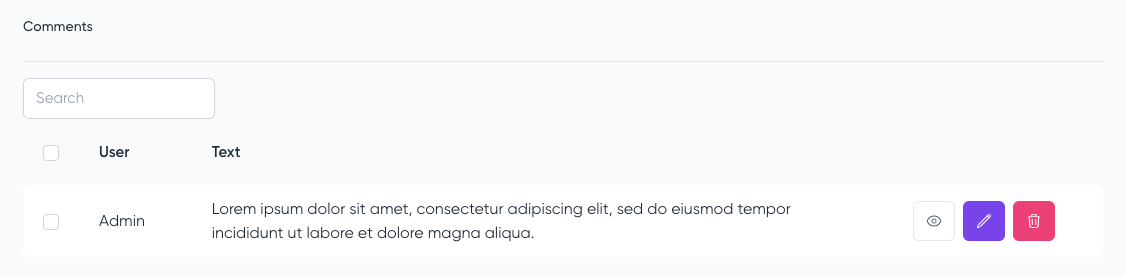
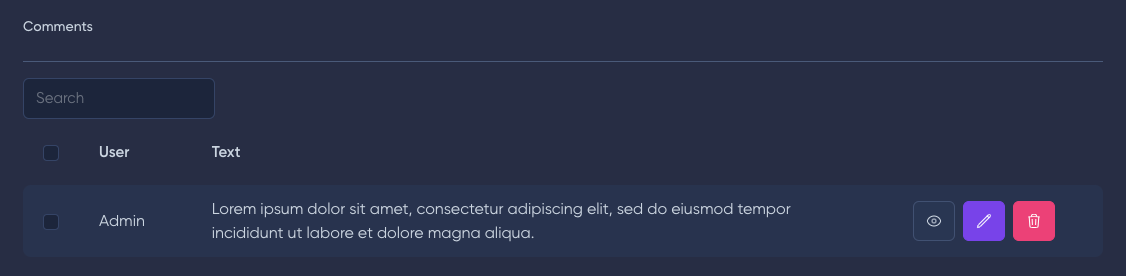
Метод fields() позволяет установить поля, которые будут отображаться в preview.
fields(FieldsContract|Closure|iterable $fields)
fields(FieldsContract|Closure|iterable $fields)
fields(FieldsContract|Closure|iterable $fields)
fields(FieldsContract|Closure|iterable $fields)
fields(FieldsContract|Closure|iterable $fields)
use MoonShine\Laravel\Fields\Relationships\BelongsTo;
use MoonShine\Laravel\Fields\Relationships\HasMany;
use MoonShine\UI\Fields\Text;
HasMany::make('Comments', resource: CommentResource::class)
->fields([
BelongsTo::make('User'),
Text::make('Text'),
])
namespaces
use MoonShine\Laravel\Fields\Relationships\BelongsTo;
use MoonShine\Laravel\Fields\Relationships\HasMany;
use MoonShine\UI\Fields\Text;
HasMany::make('Comments', resource: CommentResource::class)
->fields([
BelongsTo::make('User'),
Text::make('Text'),
])
use MoonShine\Laravel\Fields\Relationships\BelongsTo;
use MoonShine\Laravel\Fields\Relationships\HasMany;
use MoonShine\UI\Fields\Text;
HasMany::make('Comments', resource: CommentResource::class)
->fields([
BelongsTo::make('User'),
Text::make('Text'),
])
namespaces
use MoonShine\Laravel\Fields\Relationships\BelongsTo;
use MoonShine\Laravel\Fields\Relationships\HasMany;
use MoonShine\UI\Fields\Text;
HasMany::make('Comments', resource: CommentResource::class)
->fields([
BelongsTo::make('User'),
Text::make('Text'),
])
use MoonShine\Laravel\Fields\Relationships\BelongsTo;
use MoonShine\Laravel\Fields\Relationships\HasMany;
use MoonShine\UI\Fields\Text;
HasMany::make('Comments', resource: CommentResource::class)
->fields([
BelongsTo::make('User'),
Text::make('Text'),
])
Метод creatable() позволяет создать новый объект отношения через модальное окно.
creatable(
Closure|bool|null $condition = null,
?ActionButtonContract $button = null,
)
creatable(
Closure|bool|null $condition = null,
?ActionButtonContract $button = null,
)
creatable(
Closure|bool|null $condition = null,
?ActionButtonContract $button = null,
)
creatable(
Closure|bool|null $condition = null,
?ActionButtonContract $button = null,
)
creatable(
Closure|bool|null $condition = null,
?ActionButtonContract $button = null,
)
use MoonShine\Laravel\Fields\Relationships\HasMany;
HasMany::make('Comments', resource: CommentResource::class)
->creatable()
namespaces
use MoonShine\Laravel\Fields\Relationships\HasMany;
HasMany::make('Comments', resource: CommentResource::class)
->creatable()
use MoonShine\Laravel\Fields\Relationships\HasMany;
HasMany::make('Comments', resource: CommentResource::class)
->creatable()
namespaces
use MoonShine\Laravel\Fields\Relationships\HasMany;
HasMany::make('Comments', resource: CommentResource::class)
->creatable()
use MoonShine\Laravel\Fields\Relationships\HasMany;
HasMany::make('Comments', resource: CommentResource::class)
->creatable()
Поле BelongsTo, указывающее на родительскую запись, является обязательным.
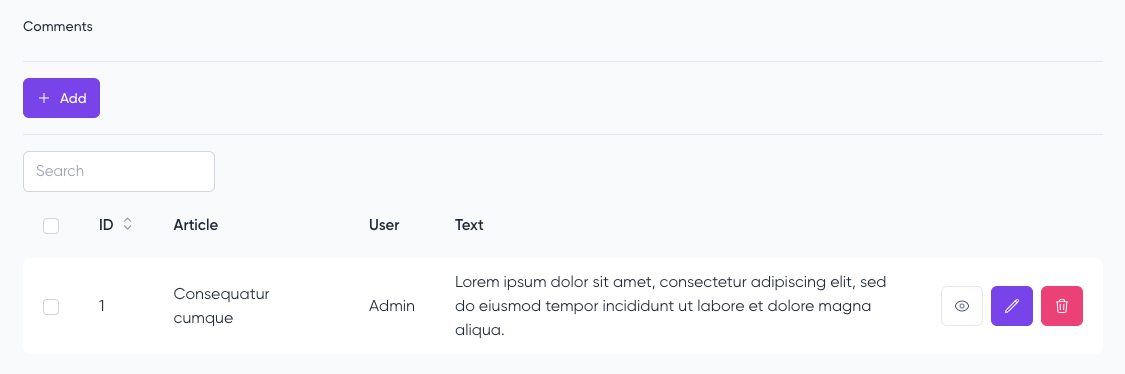
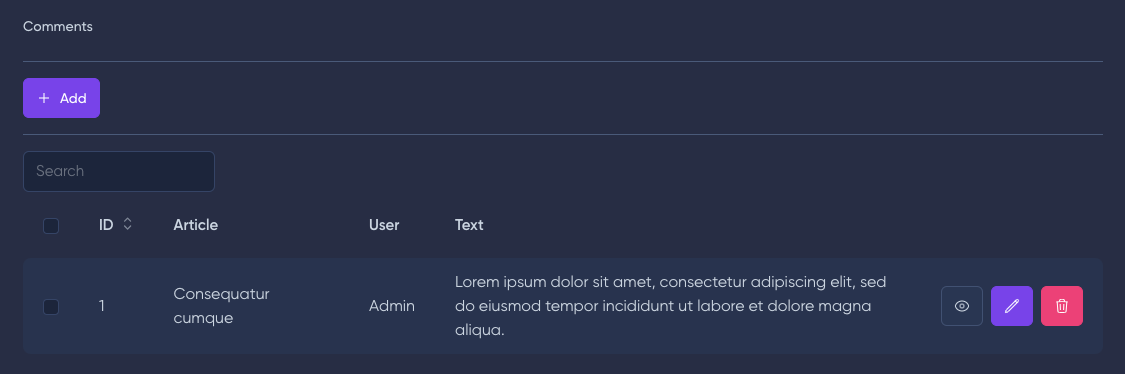
Вы можете настроить кнопку создания, передав параметр button в метод.
use MoonShine\Laravel\Fields\Relationships\HasMany;
use MoonShine\UI\Components\ActionButton;
HasMany::make('Comments', resource: CommentResource::class)
->creatable(
button: ActionButton::make('Custom button', '')
)
namespaces
use MoonShine\Laravel\Fields\Relationships\HasMany;
use MoonShine\UI\Components\ActionButton;
HasMany::make('Comments', resource: CommentResource::class)
->creatable(
button: ActionButton::make('Custom button', '')
)
use MoonShine\Laravel\Fields\Relationships\HasMany;
use MoonShine\UI\Components\ActionButton;
HasMany::make('Comments', resource: CommentResource::class)
->creatable(
button: ActionButton::make('Custom button', '')
)
namespaces
use MoonShine\Laravel\Fields\Relationships\HasMany;
use MoonShine\UI\Components\ActionButton;
HasMany::make('Comments', resource: CommentResource::class)
->creatable(
button: ActionButton::make('Custom button', '')
)
use MoonShine\Laravel\Fields\Relationships\HasMany;
use MoonShine\UI\Components\ActionButton;
HasMany::make('Comments', resource: CommentResource::class)
->creatable(
button: ActionButton::make('Custom button', '')
)
Метод limit() позволяет ограничить количество записей, отображаемых в preview.
limit(int $limit)
limit(int $limit)
limit(int $limit)
limit(int $limit)
limit(int $limit)
use MoonShine\Laravel\Fields\Relationships\HasMany;
HasMany::make('Comments', resource: CommentResource::class)
->limit(1)
namespaces
use MoonShine\Laravel\Fields\Relationships\HasMany;
HasMany::make('Comments', resource: CommentResource::class)
->limit(1)
use MoonShine\Laravel\Fields\Relationships\HasMany;
HasMany::make('Comments', resource: CommentResource::class)
->limit(1)
namespaces
use MoonShine\Laravel\Fields\Relationships\HasMany;
HasMany::make('Comments', resource: CommentResource::class)
->limit(1)
use MoonShine\Laravel\Fields\Relationships\HasMany;
HasMany::make('Comments', resource: CommentResource::class)
->limit(1)
Метод relatedLink() позволит отобразить отношение в виде ссылки с количеством элементов.
Ссылка будет вести на IndexPage дочернего ресурса из отношения HasMany, в котором буду показаны только данные элементы.
relatedLink(?string $linkRelation = null, Closure|bool $condition = null)
relatedLink(?string $linkRelation = null, Closure|bool $condition = null)
relatedLink(?string $linkRelation = null, Closure|bool $condition = null)
relatedLink(?string $linkRelation = null, Closure|bool $condition = null)
relatedLink(?string $linkRelation = null, Closure|bool $condition = null)
Вы можете передать в метод необязательные параметры:
linkRelation - ссылка на отношение,condition - замыкание или булево значение, отвечающее за отображение отношения в виде ссылки.
Не забудьте добавить отношение в свойство $with ресурса.
use MoonShine\Laravel\Fields\Relationships\HasMany;
HasMany::make('Comments', resource: CommentResource::class)
->relatedLink()
namespaces
use MoonShine\Laravel\Fields\Relationships\HasMany;
HasMany::make('Comments', resource: CommentResource::class)
->relatedLink()
use MoonShine\Laravel\Fields\Relationships\HasMany;
HasMany::make('Comments', resource: CommentResource::class)
->relatedLink()
namespaces
use MoonShine\Laravel\Fields\Relationships\HasMany;
HasMany::make('Comments', resource: CommentResource::class)
->relatedLink()
use MoonShine\Laravel\Fields\Relationships\HasMany;
HasMany::make('Comments', resource: CommentResource::class)
->relatedLink()
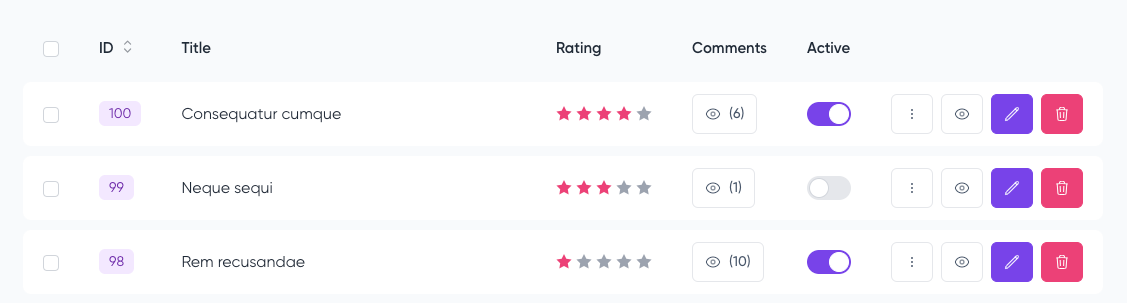
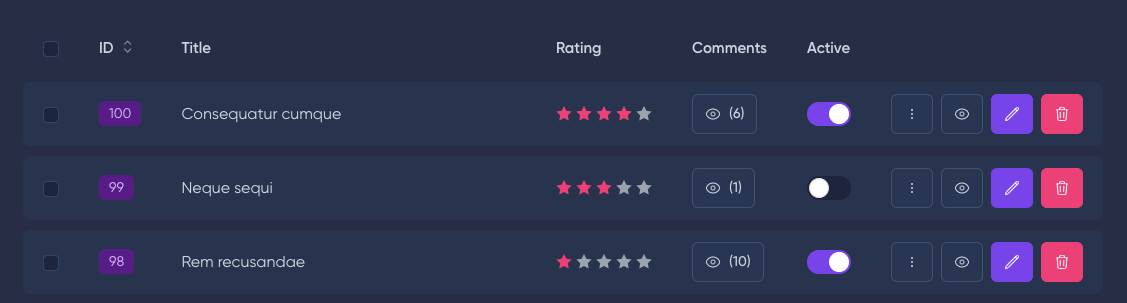
Параметр linkRelation позволяет создать ссылку на отношение с привязкой родительского ресурса.
use MoonShine\Laravel\Fields\Relationships\HasMany;
HasMany::make('Comments', resource: CommentResource::class)
->relatedLink('comment')
namespaces
use MoonShine\Laravel\Fields\Relationships\HasMany;
HasMany::make('Comments', resource: CommentResource::class)
->relatedLink('comment')
use MoonShine\Laravel\Fields\Relationships\HasMany;
HasMany::make('Comments', resource: CommentResource::class)
->relatedLink('comment')
namespaces
use MoonShine\Laravel\Fields\Relationships\HasMany;
HasMany::make('Comments', resource: CommentResource::class)
->relatedLink('comment')
use MoonShine\Laravel\Fields\Relationships\HasMany;
HasMany::make('Comments', resource: CommentResource::class)
->relatedLink('comment')
Параметр condition через замыкание позволит изменить метод отображения в зависимости от условий.
use MoonShine\Laravel\Fields\Relationships\HasMany;
use MoonShine\UI\Fields\Field;
HasMany::make('Comments', resource: CommentResource::class)
->relatedLink(condition: function (int $count, Field $field): bool {
return $count > 10;
})
namespaces
use MoonShine\Laravel\Fields\Relationships\HasMany;
use MoonShine\UI\Fields\Field;
HasMany::make('Comments', resource: CommentResource::class)
->relatedLink(condition: function (int $count, Field $field): bool {
return $count > 10;
})
use MoonShine\Laravel\Fields\Relationships\HasMany;
use MoonShine\UI\Fields\Field;
HasMany::make('Comments', resource: CommentResource::class)
->relatedLink(condition: function (int $count, Field $field): bool {
return $count > 10;
})
namespaces
use MoonShine\Laravel\Fields\Relationships\HasMany;
use MoonShine\UI\Fields\Field;
HasMany::make('Comments', resource: CommentResource::class)
->relatedLink(condition: function (int $count, Field $field): bool {
return $count > 10;
})
use MoonShine\Laravel\Fields\Relationships\HasMany;
use MoonShine\UI\Fields\Field;
HasMany::make('Comments', resource: CommentResource::class)
->relatedLink(condition: function (int $count, Field $field): bool {
return $count > 10;
})
Если у отношения есть ресурс, и вы хотите получить ID родительского элемента, то Вы можете использовать трейт ResourceWithParent.
use MoonShine\Laravel\Resources\ModelResource;
use MoonShine\Laravel\Traits\Resource\ResourceWithParent;
class PostImageResource extends ModelResource
{
use ResourceWithParent;
}
namespaces
use MoonShine\Laravel\Resources\ModelResource;
use MoonShine\Laravel\Traits\Resource\ResourceWithParent;
class PostImageResource extends ModelResource
{
use ResourceWithParent;
// ...
}
use MoonShine\Laravel\Resources\ModelResource;
use MoonShine\Laravel\Traits\Resource\ResourceWithParent;
class PostImageResource extends ModelResource
{
use ResourceWithParent;
// ...
}
namespaces
use MoonShine\Laravel\Resources\ModelResource;
use MoonShine\Laravel\Traits\Resource\ResourceWithParent;
class PostImageResource extends ModelResource
{
use ResourceWithParent;
// ...
}
use MoonShine\Laravel\Resources\ModelResource;
use MoonShine\Laravel\Traits\Resource\ResourceWithParent;
class PostImageResource extends ModelResource
{
use ResourceWithParent;
// ...
}
При использовании трейта необходимо определить методы:
protected function getParentResourceClassName(): string
{
return PostResource::class;
}
protected function getParentRelationName(): string
{
return 'post';
}
protected function getParentResourceClassName(): string
{
return PostResource::class;
}
protected function getParentRelationName(): string
{
return 'post';
}
protected function getParentResourceClassName(): string
{
return PostResource::class;
}
protected function getParentRelationName(): string
{
return 'post';
}
protected function getParentResourceClassName(): string
{
return PostResource::class;
}
protected function getParentRelationName(): string
{
return 'post';
}
protected function getParentResourceClassName(): string
{
return PostResource::class;
}
protected function getParentRelationName(): string
{
return 'post';
}
Для получения ID родителя используйте метод getParentId().
$this->getParentId();
$this->getParentId();
$this->getParentId();
$this->getParentId();
$this->getParentId();
Метод changeEditButton() позволяет полностью переопределить кнопку редактирования.
use MoonShine\Laravel\Fields\Relationships\HasMany;
use MoonShine\UI\Components\ActionButton;
HasMany::make('Comments', 'comments', resource: CommentResource::class)
->changeEditButton(
ActionButton::make(
'Edit',
fn(Comment $comment) => app(CommentResource::class)->formPageUrl($comment)
)
)
namespaces
use MoonShine\Laravel\Fields\Relationships\HasMany;
use MoonShine\UI\Components\ActionButton;
HasMany::make('Comments', 'comments', resource: CommentResource::class)
->changeEditButton(
ActionButton::make(
'Edit',
fn(Comment $comment) => app(CommentResource::class)->formPageUrl($comment)
)
)
use MoonShine\Laravel\Fields\Relationships\HasMany;
use MoonShine\UI\Components\ActionButton;
HasMany::make('Comments', 'comments', resource: CommentResource::class)
->changeEditButton(
ActionButton::make(
'Edit',
fn(Comment $comment) => app(CommentResource::class)->formPageUrl($comment)
)
)
namespaces
use MoonShine\Laravel\Fields\Relationships\HasMany;
use MoonShine\UI\Components\ActionButton;
HasMany::make('Comments', 'comments', resource: CommentResource::class)
->changeEditButton(
ActionButton::make(
'Edit',
fn(Comment $comment) => app(CommentResource::class)->formPageUrl($comment)
)
)
use MoonShine\Laravel\Fields\Relationships\HasMany;
use MoonShine\UI\Components\ActionButton;
HasMany::make('Comments', 'comments', resource: CommentResource::class)
->changeEditButton(
ActionButton::make(
'Edit',
fn(Comment $comment) => app(CommentResource::class)->formPageUrl($comment)
)
)
По умолчанию создание и редактирование записи поля HasMany происходит в модальном окне, метод withoutModals() позволяет отключить это поведение.
use MoonShine\Laravel\Fields\Relationships\HasMany;
HasMany::make('Comments', 'comments', resource: CommentResource::class)
->withoutModals()
namespaces
use MoonShine\Laravel\Fields\Relationships\HasMany;
HasMany::make('Comments', 'comments', resource: CommentResource::class)
->withoutModals()
use MoonShine\Laravel\Fields\Relationships\HasMany;
HasMany::make('Comments', 'comments', resource: CommentResource::class)
->withoutModals()
namespaces
use MoonShine\Laravel\Fields\Relationships\HasMany;
HasMany::make('Comments', 'comments', resource: CommentResource::class)
->withoutModals()
use MoonShine\Laravel\Fields\Relationships\HasMany;
HasMany::make('Comments', 'comments', resource: CommentResource::class)
->withoutModals()
Поле HasMany имеет методы, которые можно использовать для модификации кнопок, изменения TableBuilder для предпросмотра и формы, а также изменения кнопки relatedLink.
searchable()
По умолчанию на странице формы для поля HasMany доступно поле поиска.
Чтобы его отключить, можно воспользоваться методом searchable().
public function searchable(Closure|bool|null $condition = null): static
public function searchable(Closure|bool|null $condition = null): static
public function searchable(Closure|bool|null $condition = null): static
public function searchable(Closure|bool|null $condition = null): static
public function searchable(Closure|bool|null $condition = null): static
use MoonShine\Laravel\Fields\Relationships\HasMany;
HasMany::make('Comments', 'comments', resource: CommentResource::class)
->searchable(false)
namespaces
use MoonShine\Laravel\Fields\Relationships\HasMany;
HasMany::make('Comments', 'comments', resource: CommentResource::class)
->searchable(false) // отключает поле поиска
use MoonShine\Laravel\Fields\Relationships\HasMany;
HasMany::make('Comments', 'comments', resource: CommentResource::class)
->searchable(false) // отключает поле поиска
namespaces
use MoonShine\Laravel\Fields\Relationships\HasMany;
HasMany::make('Comments', 'comments', resource: CommentResource::class)
->searchable(false) // отключает поле поиска
use MoonShine\Laravel\Fields\Relationships\HasMany;
HasMany::make('Comments', 'comments', resource: CommentResource::class)
->searchable(false) // отключает поле поиска
modifyItemButtons()
Метод modifyItemButtons() позволяет изменить кнопки просмотра, редактирования, удаления и массового удаления.
modifyItemButtons(Closure $callback)
/**
* @param Closure(ActionButtonContract $detail, ActionButtonContract $edit, ActionButtonContract $delete, ActionButtonContract $massDelete, static $ctx): array $callback
*/
modifyItemButtons(Closure $callback)
/**
* @param Closure(ActionButtonContract $detail, ActionButtonContract $edit, ActionButtonContract $delete, ActionButtonContract $massDelete, static $ctx): array $callback
*/
modifyItemButtons(Closure $callback)
/**
* @param Closure(ActionButtonContract $detail, ActionButtonContract $edit, ActionButtonContract $delete, ActionButtonContract $massDelete, static $ctx): array $callback
*/
modifyItemButtons(Closure $callback)
/**
* @param Closure(ActionButtonContract $detail, ActionButtonContract $edit, ActionButtonContract $delete, ActionButtonContract $massDelete, static $ctx): array $callback
*/
modifyItemButtons(Closure $callback)
use MoonShine\Laravel\Fields\Relationships\HasMany;
use MoonShine\UI\Components\ActionButton;
HasMany::make('Comments', resource: CommentResource::class)
->modifyItemButtons(
fn(ActionButton $detail, $edit, $delete, $massDelete, HasMany $ctx) => [$detail]
)
namespaces
use MoonShine\Laravel\Fields\Relationships\HasMany;
use MoonShine\UI\Components\ActionButton;
HasMany::make('Comments', resource: CommentResource::class)
->modifyItemButtons(
fn(ActionButton $detail, $edit, $delete, $massDelete, HasMany $ctx) => [$detail]
)
use MoonShine\Laravel\Fields\Relationships\HasMany;
use MoonShine\UI\Components\ActionButton;
HasMany::make('Comments', resource: CommentResource::class)
->modifyItemButtons(
fn(ActionButton $detail, $edit, $delete, $massDelete, HasMany $ctx) => [$detail]
)
namespaces
use MoonShine\Laravel\Fields\Relationships\HasMany;
use MoonShine\UI\Components\ActionButton;
HasMany::make('Comments', resource: CommentResource::class)
->modifyItemButtons(
fn(ActionButton $detail, $edit, $delete, $massDelete, HasMany $ctx) => [$detail]
)
use MoonShine\Laravel\Fields\Relationships\HasMany;
use MoonShine\UI\Components\ActionButton;
HasMany::make('Comments', resource: CommentResource::class)
->modifyItemButtons(
fn(ActionButton $detail, $edit, $delete, $massDelete, HasMany $ctx) => [$detail]
)
modifyRelatedLink()
Метод modifyRelatedLink() позволяет изменить кнопку relatedLink.
use MoonShine\Laravel\Fields\Relationships\HasMany;
use MoonShine\UI\Components\ActionButton;
HasMany::make('Comments', resource: CommentResource::class)
->relatedLink()
->modifyRelatedLink(
fn(ActionButton $button, bool $preview) => $button
->when($preview, fn(ActionButton $btn) => $btn->primary())
->unless($preview, fn(ActionButton $btn) => $btn->secondary())
)
namespaces
use MoonShine\Laravel\Fields\Relationships\HasMany;
use MoonShine\UI\Components\ActionButton;
HasMany::make('Comments', resource: CommentResource::class)
->relatedLink()
->modifyRelatedLink(
fn(ActionButton $button, bool $preview) => $button
->when($preview, fn(ActionButton $btn) => $btn->primary())
->unless($preview, fn(ActionButton $btn) => $btn->secondary())
)
use MoonShine\Laravel\Fields\Relationships\HasMany;
use MoonShine\UI\Components\ActionButton;
HasMany::make('Comments', resource: CommentResource::class)
->relatedLink()
->modifyRelatedLink(
fn(ActionButton $button, bool $preview) => $button
->when($preview, fn(ActionButton $btn) => $btn->primary())
->unless($preview, fn(ActionButton $btn) => $btn->secondary())
)
namespaces
use MoonShine\Laravel\Fields\Relationships\HasMany;
use MoonShine\UI\Components\ActionButton;
HasMany::make('Comments', resource: CommentResource::class)
->relatedLink()
->modifyRelatedLink(
fn(ActionButton $button, bool $preview) => $button
->when($preview, fn(ActionButton $btn) => $btn->primary())
->unless($preview, fn(ActionButton $btn) => $btn->secondary())
)
use MoonShine\Laravel\Fields\Relationships\HasMany;
use MoonShine\UI\Components\ActionButton;
HasMany::make('Comments', resource: CommentResource::class)
->relatedLink()
->modifyRelatedLink(
fn(ActionButton $button, bool $preview) => $button
->when($preview, fn(ActionButton $btn) => $btn->primary())
->unless($preview, fn(ActionButton $btn) => $btn->secondary())
)
modifyCreateButton() / modifyEditButton()
Методы modifyCreateButton() и modifyEditButton() позволяют изменить кнопки создания и редактирования.
use MoonShine\Laravel\Fields\Relationships\HasMany;
use MoonShine\UI\Components\ActionButton;
HasMany::make('Comments', resource: CommentResource::class)
->modifyCreateButton(
fn(ActionButton $button) => $button->setLabel('Custom create button')
)
->modifyEditButton(
fn(ActionButton $button) => $button->setLabel('Custom edit button')
)
->creatable(true)
namespaces
use MoonShine\Laravel\Fields\Relationships\HasMany;
use MoonShine\UI\Components\ActionButton;
HasMany::make('Comments', resource: CommentResource::class)
->modifyCreateButton(
fn(ActionButton $button) => $button->setLabel('Custom create button')
)
->modifyEditButton(
fn(ActionButton $button) => $button->setLabel('Custom edit button')
)
->creatable(true)
use MoonShine\Laravel\Fields\Relationships\HasMany;
use MoonShine\UI\Components\ActionButton;
HasMany::make('Comments', resource: CommentResource::class)
->modifyCreateButton(
fn(ActionButton $button) => $button->setLabel('Custom create button')
)
->modifyEditButton(
fn(ActionButton $button) => $button->setLabel('Custom edit button')
)
->creatable(true)
namespaces
use MoonShine\Laravel\Fields\Relationships\HasMany;
use MoonShine\UI\Components\ActionButton;
HasMany::make('Comments', resource: CommentResource::class)
->modifyCreateButton(
fn(ActionButton $button) => $button->setLabel('Custom create button')
)
->modifyEditButton(
fn(ActionButton $button) => $button->setLabel('Custom edit button')
)
->creatable(true)
use MoonShine\Laravel\Fields\Relationships\HasMany;
use MoonShine\UI\Components\ActionButton;
HasMany::make('Comments', resource: CommentResource::class)
->modifyCreateButton(
fn(ActionButton $button) => $button->setLabel('Custom create button')
)
->modifyEditButton(
fn(ActionButton $button) => $button->setLabel('Custom edit button')
)
->creatable(true)
modifyTable()
Метод modifyTable() позволяет изменить TableBuilder для предпросмотра и формы.
use MoonShine\Laravel\Fields\Relationships\HasMany;
use MoonShine\UI\Components\Table\TableBuilder;
HasMany::make('Comments', resource: CommentResource::class)
->modifyTable(
fn(TableBuilder $table, bool $preview) => $table
->when($preview, fn(TableBuilder $tbl) => $tbl->customAttributes(['style' => 'background: blue']))
->unless($preview, fn(TableBuilder $tbl) => $tbl->customAttributes(['style' => 'background: green']))
)
namespaces
use MoonShine\Laravel\Fields\Relationships\HasMany;
use MoonShine\UI\Components\Table\TableBuilder;
HasMany::make('Comments', resource: CommentResource::class)
->modifyTable(
fn(TableBuilder $table, bool $preview) => $table
->when($preview, fn(TableBuilder $tbl) => $tbl->customAttributes(['style' => 'background: blue']))
->unless($preview, fn(TableBuilder $tbl) => $tbl->customAttributes(['style' => 'background: green']))
)
use MoonShine\Laravel\Fields\Relationships\HasMany;
use MoonShine\UI\Components\Table\TableBuilder;
HasMany::make('Comments', resource: CommentResource::class)
->modifyTable(
fn(TableBuilder $table, bool $preview) => $table
->when($preview, fn(TableBuilder $tbl) => $tbl->customAttributes(['style' => 'background: blue']))
->unless($preview, fn(TableBuilder $tbl) => $tbl->customAttributes(['style' => 'background: green']))
)
namespaces
use MoonShine\Laravel\Fields\Relationships\HasMany;
use MoonShine\UI\Components\Table\TableBuilder;
HasMany::make('Comments', resource: CommentResource::class)
->modifyTable(
fn(TableBuilder $table, bool $preview) => $table
->when($preview, fn(TableBuilder $tbl) => $tbl->customAttributes(['style' => 'background: blue']))
->unless($preview, fn(TableBuilder $tbl) => $tbl->customAttributes(['style' => 'background: green']))
)
use MoonShine\Laravel\Fields\Relationships\HasMany;
use MoonShine\UI\Components\Table\TableBuilder;
HasMany::make('Comments', resource: CommentResource::class)
->modifyTable(
fn(TableBuilder $table, bool $preview) => $table
->when($preview, fn(TableBuilder $tbl) => $tbl->customAttributes(['style' => 'background: blue']))
->unless($preview, fn(TableBuilder $tbl) => $tbl->customAttributes(['style' => 'background: green']))
)
Редирект после изменения
Метод redirectAfter() позволяет редирект после сохранения/добавления/удаления.
use MoonShine\Laravel\Fields\Relationships\HasMany;
HasMany::make('Comments', resource: CommentResource::class)
->redirectAfter(fn(int $parentId) => route('home'))
namespaces
use MoonShine\Laravel\Fields\Relationships\HasMany;
HasMany::make('Comments', resource: CommentResource::class)
->redirectAfter(fn(int $parentId) => route('home'))
use MoonShine\Laravel\Fields\Relationships\HasMany;
HasMany::make('Comments', resource: CommentResource::class)
->redirectAfter(fn(int $parentId) => route('home'))
namespaces
use MoonShine\Laravel\Fields\Relationships\HasMany;
HasMany::make('Comments', resource: CommentResource::class)
->redirectAfter(fn(int $parentId) => route('home'))
use MoonShine\Laravel\Fields\Relationships\HasMany;
HasMany::make('Comments', resource: CommentResource::class)
->redirectAfter(fn(int $parentId) => route('home'))
Модификация QueryBuilder
Метод modifyBuilder() позволяет модифицировать запрос через QueryBuilder.
use Illuminate\Database\Eloquent\Relations\Relation;
use MoonShine\Laravel\Fields\Relationships\HasMany;
HasMany::make('Comments', resource: CommentResource::class)
->modifyBuilder(fn(Relation $query, HasMany $ctx) => $query)
namespaces
use Illuminate\Database\Eloquent\Relations\Relation;
use MoonShine\Laravel\Fields\Relationships\HasMany;
HasMany::make('Comments', resource: CommentResource::class)
->modifyBuilder(fn(Relation $query, HasMany $ctx) => $query)
use Illuminate\Database\Eloquent\Relations\Relation;
use MoonShine\Laravel\Fields\Relationships\HasMany;
HasMany::make('Comments', resource: CommentResource::class)
->modifyBuilder(fn(Relation $query, HasMany $ctx) => $query)
namespaces
use Illuminate\Database\Eloquent\Relations\Relation;
use MoonShine\Laravel\Fields\Relationships\HasMany;
HasMany::make('Comments', resource: CommentResource::class)
->modifyBuilder(fn(Relation $query, HasMany $ctx) => $query)
use Illuminate\Database\Eloquent\Relations\Relation;
use MoonShine\Laravel\Fields\Relationships\HasMany;
HasMany::make('Comments', resource: CommentResource::class)
->modifyBuilder(fn(Relation $query, HasMany $ctx) => $query)
Есть возможность быстро включать/выключать определенные действия в рамках HasMany.
Метод activeActions() явно задаёт список доступных действий.
HasMany::make('Comments')
->activeActions(
Action::VIEW,
Action::UPDATE,
)
HasMany::make('Comments')
->activeActions(
Action::VIEW,
Action::UPDATE,
)
HasMany::make('Comments')
->activeActions(
Action::VIEW,
Action::UPDATE,
)
HasMany::make('Comments')
->activeActions(
Action::VIEW,
Action::UPDATE,
)
HasMany::make('Comments')
->activeActions(
Action::VIEW,
Action::UPDATE,
)
Метод withoutActions() позволяет исключить отдельные действия.
HasMany::make('Comments')
->withoutActions(
Action::VIEW
)
HasMany::make('Comments')
->withoutActions(
Action::VIEW
)
HasMany::make('Comments')
->withoutActions(
Action::VIEW
)
HasMany::make('Comments')
->withoutActions(
Action::VIEW
)
HasMany::make('Comments')
->withoutActions(
Action::VIEW
)
Политики и activeActions ресурса имеют приоритет. Если ресурс закрывает доступ, то activeActions поля доступ не предоставит.
indexButtons()
Метод indexButtons() позволяет добавить дополнительные ActionButtons для работы с элементами HasMany.
use MoonShine\Laravel\Fields\Relationships\HasMany;
HasMany::make('Comments', 'comments', resource: CommentResource::class)
->indexButtons([
ActionButton::make('Custom button')
])
namespaces
use MoonShine\Laravel\Fields\Relationships\HasMany;
HasMany::make('Comments', 'comments', resource: CommentResource::class)
->indexButtons([
ActionButton::make('Custom button')
])
use MoonShine\Laravel\Fields\Relationships\HasMany;
HasMany::make('Comments', 'comments', resource: CommentResource::class)
->indexButtons([
ActionButton::make('Custom button')
])
namespaces
use MoonShine\Laravel\Fields\Relationships\HasMany;
HasMany::make('Comments', 'comments', resource: CommentResource::class)
->indexButtons([
ActionButton::make('Custom button')
])
use MoonShine\Laravel\Fields\Relationships\HasMany;
HasMany::make('Comments', 'comments', resource: CommentResource::class)
->indexButtons([
ActionButton::make('Custom button')
])
formButtons()
Метод formButtons() позволяет добавить дополнительные ActionButtons внутри формы при создании или редактировании элемента HasMany.
use MoonShine\Laravel\Fields\Relationships\HasMany;
use MoonShine\UI\Components\ActionButton;
HasMany::make('Comments', 'comments', resource: CommentResource::class)
->formButtons([
ActionButton::make('Custom form button')
])
namespaces
use MoonShine\Laravel\Fields\Relationships\HasMany;
use MoonShine\UI\Components\ActionButton;
HasMany::make('Comments', 'comments', resource: CommentResource::class)
->formButtons([
ActionButton::make('Custom form button')
])
use MoonShine\Laravel\Fields\Relationships\HasMany;
use MoonShine\UI\Components\ActionButton;
HasMany::make('Comments', 'comments', resource: CommentResource::class)
->formButtons([
ActionButton::make('Custom form button')
])
namespaces
use MoonShine\Laravel\Fields\Relationships\HasMany;
use MoonShine\UI\Components\ActionButton;
HasMany::make('Comments', 'comments', resource: CommentResource::class)
->formButtons([
ActionButton::make('Custom form button')
])
use MoonShine\Laravel\Fields\Relationships\HasMany;
use MoonShine\UI\Components\ActionButton;
HasMany::make('Comments', 'comments', resource: CommentResource::class)
->formButtons([
ActionButton::make('Custom form button')
])
Отображение внутри Tabs
Поля отношений в MoonShine по умолчанию отображаются внизу, отдельно от формы, и следуют друг за другом.
Чтобы изменить отображение поля и добавить его в Tabs, можно использовать метод tabMode().
tabMode(Closure|bool|null $condition = null)
tabMode(Closure|bool|null $condition = null)
tabMode(Closure|bool|null $condition = null)
tabMode(Closure|bool|null $condition = null)
tabMode(Closure|bool|null $condition = null)
В следующем примере будет создан компонент Tabs с двумя вкладками Comments и Covers.
use MoonShine\Laravel\Fields\Relationships\HasMany;
HasMany::make('Comments', 'comments', resource: CommentResource::class)
->tabMode(),
HasMany::make('Covers', 'covers', resource: CoverResource::class)
->tabMode()
namespaces
use MoonShine\Laravel\Fields\Relationships\HasMany;
HasMany::make('Comments', 'comments', resource: CommentResource::class)
->tabMode(),
HasMany::make('Covers', 'covers', resource: CoverResource::class)
->tabMode()
use MoonShine\Laravel\Fields\Relationships\HasMany;
HasMany::make('Comments', 'comments', resource: CommentResource::class)
->tabMode(),
HasMany::make('Covers', 'covers', resource: CoverResource::class)
->tabMode()
namespaces
use MoonShine\Laravel\Fields\Relationships\HasMany;
HasMany::make('Comments', 'comments', resource: CommentResource::class)
->tabMode(),
HasMany::make('Covers', 'covers', resource: CoverResource::class)
->tabMode()
use MoonShine\Laravel\Fields\Relationships\HasMany;
HasMany::make('Comments', 'comments', resource: CommentResource::class)
->tabMode(),
HasMany::make('Covers', 'covers', resource: CoverResource::class)
->tabMode()
tabMode не будет работать при использовании метода disableOutside()
Отображение внутри модального окна
Для того чтобы HasMany поле было отображено в модальном окне, которое вызывается по кнопке, можно использовать режим modalMode().
public function modalMode(
Closure|bool|null $condition = null,
?Closure $modifyButton = null,
?Closure $modifyModal = null
)
public function modalMode(
Closure|bool|null $condition = null,
?Closure $modifyButton = null,
?Closure $modifyModal = null
)
public function modalMode(
Closure|bool|null $condition = null,
?Closure $modifyButton = null,
?Closure $modifyModal = null
)
public function modalMode(
Closure|bool|null $condition = null,
?Closure $modifyButton = null,
?Closure $modifyModal = null
)
public function modalMode(
Closure|bool|null $condition = null,
?Closure $modifyButton = null,
?Closure $modifyModal = null
)
В данном примере вместо таблицы теперь будет ActionButton, который вызывает Modal.
use MoonShine\Laravel\Fields\Relationships\HasMany;
HasMany::make('Comments', 'comments', resource: CommentResource::class)
->modalMode(),
namespaces
use MoonShine\Laravel\Fields\Relationships\HasMany;
HasMany::make('Comments', 'comments', resource: CommentResource::class)
->modalMode(),
use MoonShine\Laravel\Fields\Relationships\HasMany;
HasMany::make('Comments', 'comments', resource: CommentResource::class)
->modalMode(),
namespaces
use MoonShine\Laravel\Fields\Relationships\HasMany;
HasMany::make('Comments', 'comments', resource: CommentResource::class)
->modalMode(),
use MoonShine\Laravel\Fields\Relationships\HasMany;
HasMany::make('Comments', 'comments', resource: CommentResource::class)
->modalMode(),
Чтобы модифицировать ActionButton и Modal, можно воспользоваться параметрами метода $modifyButton и $modifyModal, в которые можно передать замыкание.
use MoonShine\Laravel\Fields\Relationships\HasMany;
HasMany::make('Comments', 'comments', resource: CommentResource::class)
->modalMode(
modifyButton: function (ActionButtonContract $button, HasMany $ctx) {
$button->warning();
return $button;
},
modifyModal: function (Modal $modal, ActionButtonContract $ctx) {
$modal->autoClose(false);
return $modal;
}
)
namespaces
use MoonShine\Laravel\Fields\Relationships\HasMany;
HasMany::make('Comments', 'comments', resource: CommentResource::class)
->modalMode(
modifyButton: function (ActionButtonContract $button, HasMany $ctx) {
$button->warning();
return $button;
},
modifyModal: function (Modal $modal, ActionButtonContract $ctx) {
$modal->autoClose(false);
return $modal;
}
)
use MoonShine\Laravel\Fields\Relationships\HasMany;
HasMany::make('Comments', 'comments', resource: CommentResource::class)
->modalMode(
modifyButton: function (ActionButtonContract $button, HasMany $ctx) {
$button->warning();
return $button;
},
modifyModal: function (Modal $modal, ActionButtonContract $ctx) {
$modal->autoClose(false);
return $modal;
}
)
namespaces
use MoonShine\Laravel\Fields\Relationships\HasMany;
HasMany::make('Comments', 'comments', resource: CommentResource::class)
->modalMode(
modifyButton: function (ActionButtonContract $button, HasMany $ctx) {
$button->warning();
return $button;
},
modifyModal: function (Modal $modal, ActionButtonContract $ctx) {
$modal->autoClose(false);
return $modal;
}
)
use MoonShine\Laravel\Fields\Relationships\HasMany;
HasMany::make('Comments', 'comments', resource: CommentResource::class)
->modalMode(
modifyButton: function (ActionButtonContract $button, HasMany $ctx) {
$button->warning();
return $button;
},
modifyModal: function (Modal $modal, ActionButtonContract $ctx) {
$modal->autoClose(false);
return $modal;
}
)
Местоположение поля
Поле используется только внутри CRUD-страниц, так как получает ресурс и страницу из URL.
Однако вы можете использовать его и на других страницах, указав местоположение через метод nowOn().
HasMany::make('Comments', resource: CommentResource::class)
->creatable()
->nowOn(page: $resource->getFormPage(), resource: $resource, params: ['resourceItem' => $item->getKey()])
->fillCast($item, new ModelCaster(Article::class)),
HasMany::make('Comments', resource: CommentResource::class)
->creatable()
->nowOn(page: $resource->getFormPage(), resource: $resource, params: ['resourceItem' => $item->getKey()])
->fillCast($item, new ModelCaster(Article::class)),
HasMany::make('Comments', resource: CommentResource::class)
->creatable()
->nowOn(page: $resource->getFormPage(), resource: $resource, params: ['resourceItem' => $item->getKey()])
->fillCast($item, new ModelCaster(Article::class)),
HasMany::make('Comments', resource: CommentResource::class)
->creatable()
->nowOn(page: $resource->getFormPage(), resource: $resource, params: ['resourceItem' => $item->getKey()])
->fillCast($item, new ModelCaster(Article::class)),
HasMany::make('Comments', resource: CommentResource::class)
->creatable()
->nowOn(page: $resource->getFormPage(), resource: $resource, params: ['resourceItem' => $item->getKey()])
->fillCast($item, new ModelCaster(Article::class)),
Отношение через RelationRepeater поле
Поле HasMany по умолчанию отображается вне основной формы ресурса.
Если вам нужно отобразить поля отношения внутри основной формы, то вы можете использовать поле RelationRepeater.
use MoonShine\UI\Fields\Text;
use MoonShine\Laravel\Fields\Relationships\RelationRepeater;
RelationRepeater::make('Characteristics', 'characteristics')
->fields([
ID::make(),
Text::make('Name', 'name'),
Text::make('Value', 'value'),
])
namespaces
use MoonShine\UI\Fields\Text;
use MoonShine\Laravel\Fields\Relationships\RelationRepeater;
RelationRepeater::make('Characteristics', 'characteristics')
->fields([
ID::make(),
Text::make('Name', 'name'),
Text::make('Value', 'value'),
])
use MoonShine\UI\Fields\Text;
use MoonShine\Laravel\Fields\Relationships\RelationRepeater;
RelationRepeater::make('Characteristics', 'characteristics')
->fields([
ID::make(),
Text::make('Name', 'name'),
Text::make('Value', 'value'),
])
namespaces
use MoonShine\UI\Fields\Text;
use MoonShine\Laravel\Fields\Relationships\RelationRepeater;
RelationRepeater::make('Characteristics', 'characteristics')
->fields([
ID::make(),
Text::make('Name', 'name'),
Text::make('Value', 'value'),
])
use MoonShine\UI\Fields\Text;
use MoonShine\Laravel\Fields\Relationships\RelationRepeater;
RelationRepeater::make('Characteristics', 'characteristics')
->fields([
ID::make(),
Text::make('Name', 'name'),
Text::make('Value', 'value'),
])
Отношение через поле Template
Используя поле Template, вы можете построить поле для отношений HasMany, используя fluent интерфейс в процессе декларации.
Для более подробной информации обратитесь к разделу Поле Template.

