

Basics
Contains all Basic methods.
The Text field is a basic text input field in MoonShine. This field is equivalent to <input type="text">.
use MoonShine\UI\Fields\Text;Text::make('Title')
use MoonShine\UI\Fields\Text;Text::make('Title')
Basic methods
Placeholder
The placeholder() method allows you to set placeholder text for the field.
Mask
The mask() method allows you to apply a mask to the entered text.
Example usage:


Tags
The tags() method transforms the text field into a tag input field.
Disable escaping
The unescape() method disables HTML tag escaping in the field value.
Extensions
Fields support various extensions to assist with input control.
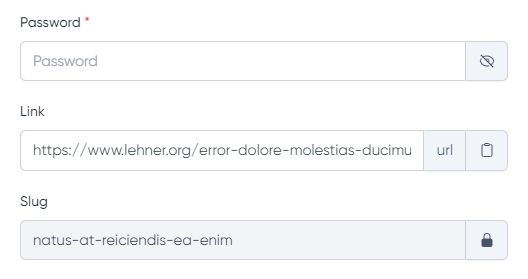
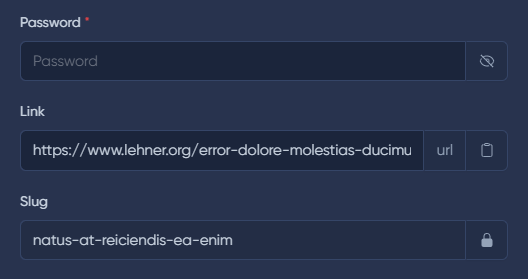
Copy
The copy() method adds a button to copy the field value.
Hide value
The eye() method adds a button to show/hide the field value (e.g., for passwords).
Lock
The locked() method adds a lock icon to the field.
Prefix
The prefix() method adds a prefix to the input field.
Suffix
The suffix() method adds a suffix to the input field.
PrettyLimit
The prettyLimit() method allows displaying field value in preview mode with limited width. The full text is shown on hover.
use MoonShine\Support\Enums\Color;use MoonShine\UI\Fields\Text;Text::make('Title', 'title')->prettyLimit(Color::PRIMARY);// with dynamic valuesText::make('Status', 'status')->prettyLimit(color: fn($value, $field) => $value === 'active' ? Color::SUCCESS : Color::ERROR,label: fn($value, $field) => $value === 'active' ? 'Active' : 'Inactive',limit: 200);
use MoonShine\Support\Enums\Color;use MoonShine\UI\Fields\Text;Text::make('Title', 'title')->prettyLimit(Color::PRIMARY);// with dynamic valuesText::make('Status', 'status')->prettyLimit(color: fn($value, $field) => $value === 'active' ? Color::SUCCESS : Color::ERROR,label: fn($value, $field) => $value === 'active' ? 'Active' : 'Inactive',limit: 200);
Learn more about the component in the PrettyLimit section.
Editing in preview mode
This field supports editing in preview mode.
If you want to avoid input errors, you can use the Lock extension.