Recipes

How can I add custom elements to the detail page or modify it?

If the default detail page layout is not enough, you can override DetailPage and assemble the page using the components you need.

This is useful when you need to:

  • add custom blocks next to fields;
  • change the order of elements;
  • display related data, tables, buttons, or other custom widgets;
  • fully adapt the page to a specific resource scenario.
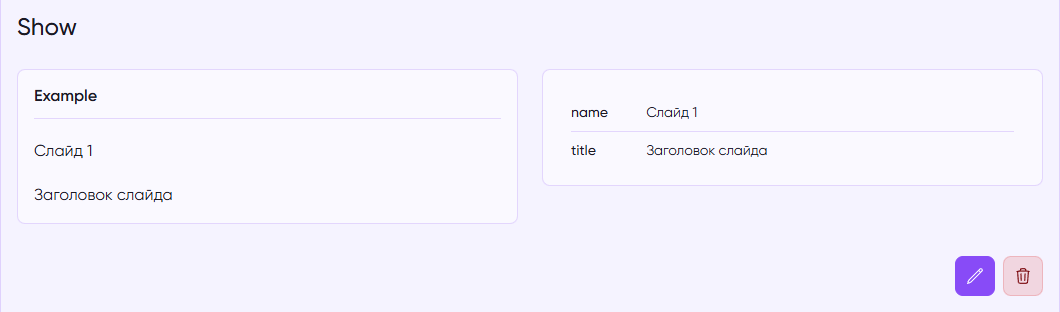
Modified DetailPage

class ExampleDetailPage extends DetailPage
{
protected function mainLayer(): array
{
return [
$this->getDetailComponent(),
LineBreak::make(),
...$this->getTopButtons(),
];
}
 
public function getDetailComponent(bool $withoutFragment = false): ComponentContract
{
return Fragment::make([
Grid::make([
Column::make([
$this->fieldsOne(),
], colSpan: 6),
 
Column::make([
$this->fieldsTwo(),
], colSpan: 6),
]),
])->name('crud-detail');
}
 
protected function fieldsOne()
{
return FieldsGroup::make([
Box::make('Example', [
Text::make('name'),
Text::make('title'),
]),
])
->fill($this->getItem()->toArray(), $this->getResource()->getCastedData())
->previewMode();
}
 
protected function fieldsTwo()
{
$resource = $this->getResource();
 
return Box::make([
TableBuilder::make([
Text::make('name'),
Text::make('title'),
])
->cast($resource->getCaster())
->items([$resource->getItem()])
->vertical()
->simple()
->preview()
->class('table-divider'),
]);
}
}
class ExampleDetailPage extends DetailPage
{
protected function mainLayer(): array
{
return [
$this->getDetailComponent(),
LineBreak::make(),
...$this->getTopButtons(),
];
}
 
public function getDetailComponent(bool $withoutFragment = false): ComponentContract
{
return Fragment::make([
Grid::make([
Column::make([
$this->fieldsOne(),
], colSpan: 6),
 
Column::make([
$this->fieldsTwo(),
], colSpan: 6),
]),
])->name('crud-detail');
}
 
protected function fieldsOne()
{
return FieldsGroup::make([
Box::make('Example', [
Text::make('name'),
Text::make('title'),
]),
])
->fill($this->getItem()->toArray(), $this->getResource()->getCastedData())
->previewMode();
}
 
protected function fieldsTwo()
{
$resource = $this->getResource();
 
return Box::make([
TableBuilder::make([
Text::make('name'),
Text::make('title'),
])
->cast($resource->getCaster())
->items([$resource->getItem()])
->vertical()
->simple()
->preview()
->class('table-divider'),
]);
}
}

In this example:

  • mainLayer() defines the overall page structure;
  • getDetailComponent() is responsible for the main content block;
  • Fragment, Grid, and Column help you build a custom layout;
  • FieldsGroup and Box make it easy to group fields;
  • previewMode() switches fields to display-only mode.

This allows you not only to add custom elements to the detail page, but also to fully restructure it for your specific use case — from a compact field block to a more complex page with additional information and actions.